Step 3 — Wait for DNS Verification and Activate Protection
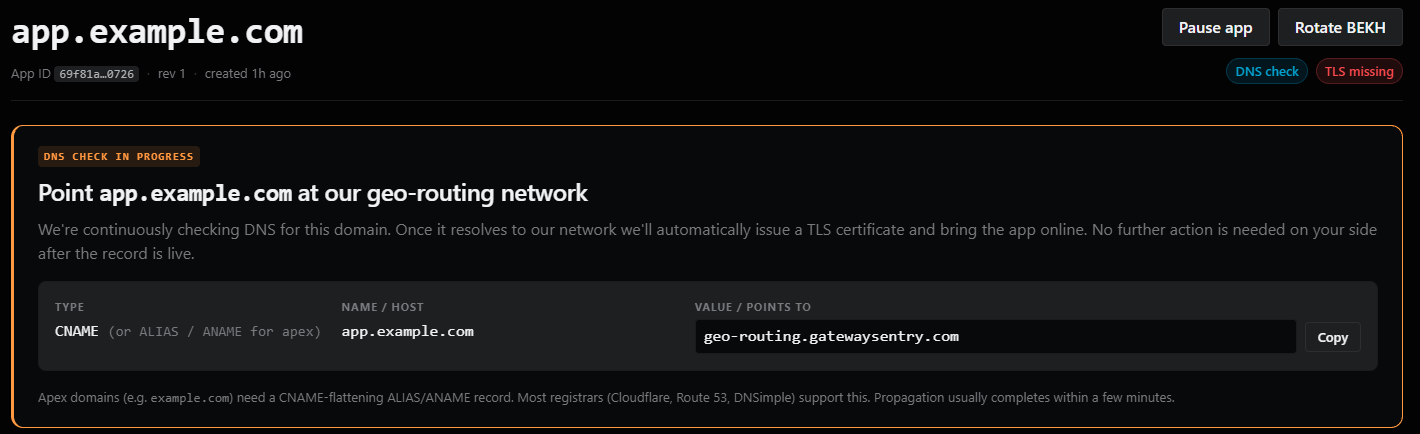
Once your Web Protection instance is created and your DNS record has been updated, GatewaySentry will begin verifying your setup.
- Your new instance will initially show the status: "DNS CHECK IS IN PROGRESS". This is normal — GatewaySentry is confirming that your domain now resolves to our anycasted network.
- Once the DNS check is complete and successful, your Web Protection status will change to Active.
- With protection active, you can now begin configuring Flow Rules to customize how traffic is handled.
What are Flow Rules? Flow Rules allow you to define specific policies for your traffic — such as requiring CAPTCHA challenges or allowing trusted IPs to bypass checks.
Next Steps
You're done with setup! Here's what to look at next:
- Configuring Flow Rules — Define how incoming traffic is challenged, filtered, and shaped.
- Troubleshooting — If something isn't working as expected.