Reading the Rules List
Each rule in the firewall list shows a compact summary. This page explains how to read it.
01  IN   ALL ← 10.28.30.149/32   ACCEPT  stateless
02  OUT  ALL → 192.168.1.0/24    ACCEPT  stateless
*   ALL  Anything not matched above  DROP  default policy
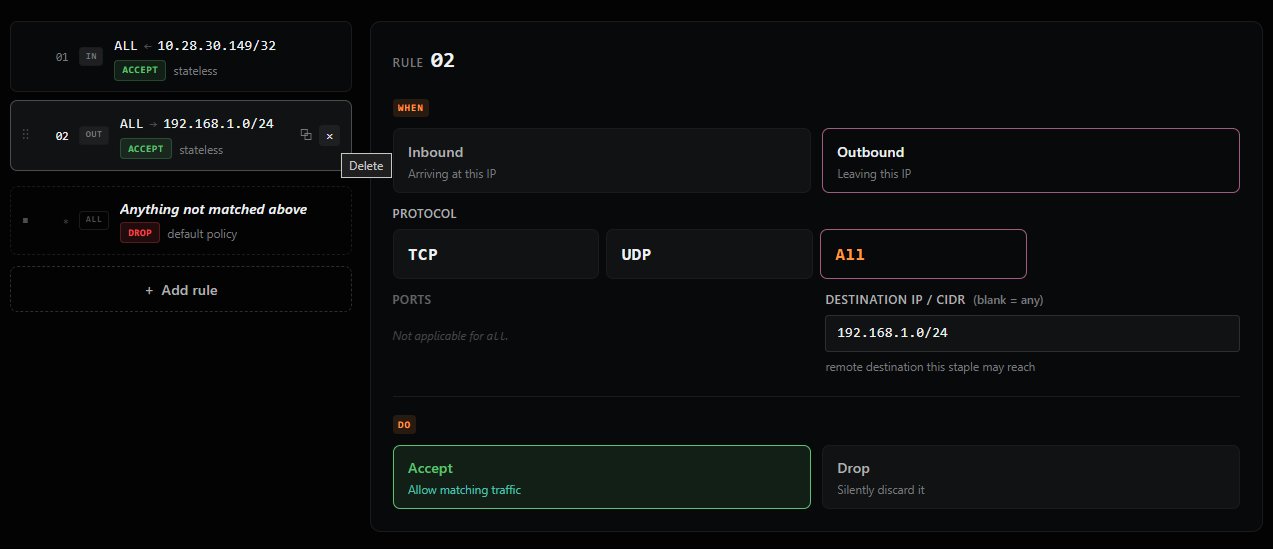
| Element | Meaning |
|---|---|
Number (01, 02, ...) |
Evaluation order. Rules are checked top-to-bottom. |
Direction badge (IN / OUT) |
Whether the rule applies to inbound or outbound traffic. |
Protocol (TCP / UDP / ALL) |
The protocol the rule matches. |
Arrow + IP (← 10.28.30.149/32 or → 192.168.1.0/24) |
The remote IP or CIDR. The arrow direction matches the rule direction (← for source on inbound, → for destination on outbound). |
Action badge (ACCEPT / DROP) |
What happens to matching traffic. |
stateless indicator |
Shown when the rule doesn't use connection state matching. See the Connection State section in Step 3 for details. |